This is a series of articles about database version control and database-as-code (GitOps)
- Database Version Control (this one)
- Database Version Control, State-based or Migration-based?
- Database as Code - the Good, the Bad and the Ugly
- The Database as Code Landscape
- Database Version Control Best Practice
Database version control is the practice of managing and tracking changes to a database schema over time: keeping a history of modifications so teams can review changes, reproduce environments, and deploy updates with confidence. Version control for application code has been the unquestioned default for decades. For databases, adoption still lags, and the reason is not laziness.
Why It's Harder Than Versioning Code
Code is stateless artifacts. Deploying version 42 means replacing version 41's files; rolling back means putting version 41's files back. Any version can be materialized from the repository at any time.
A database carries state, and that breaks the model in two ways:
- You cannot check out a version, only migrate to it. The repository can describe schema v42, but a production database at v41 holds terabytes of data that must be transformed, not replaced. So database version control ends up versioning transitions (migration scripts) where code version control versions states. Getting from here to there is itself the artifact.
- Rollback is asymmetric. Reverting code restores the old behavior exactly. Reverting
DROP COLUMNcannot restore the data that was in the column. Some transitions are one-way doors, which is why database changes deserve stricter review than code changes in the first place.
Understanding these two properties explains almost every design decision in the tooling below.
What Gets Versioned
- Schema (DDL): tables, indexes, views, functions. The core payload.
- Reference data: the small lookup tables (currencies, feature flags, plan tiers) that the application can't run without. Versioned because environments must agree on them.
- Not business data. Customer rows are protected by backups and replication, not version control. Mixing the two concerns is a common early mistake.
The Mechanics
Every migration-based tool (Flyway, Liquibase, Atlas, Rails/Django/Prisma migrations, Bytebase) converges on the same three-part design:
- Ordered migration files in the repository.
V042__add_orders_status.sql. The order is the contract: replaying them from zero produces the current schema. - A version table in the database itself.
flyway_schema_history,schema_migrations, or equivalent: which migrations have been applied here, when, by whom. This is what makes deploys idempotent, so applying the pipeline to a database twice is a no-op instead of a disaster. - Checksums, in most tools. Flyway, Liquibase, and Prisma record each applied migration's hash and refuse to proceed if a historical file was edited; Rails and Django stop at recording applied versions, so an edited old migration there fails silently instead of loudly. Either way the discipline is the same: migration history is append-only for the same reason an accounting ledger is, corrections are new entries, never edits.
The review workflow rides on top: a migration is code, so it goes through a pull request, automated lint (does this ALTER lock the table?), and an approval appropriate to the risk before any tool applies it.
Deployment and Rollback, Honestly
Controlled deployment is the easy half: environments progress in order (dev, staging, prod), each database's version table says exactly where it is, and the same script runs everywhere, which eliminates the "worked in staging" class of surprise.
Rollback deserves honesty rather than a checkbox. The options, in order of realism:
- Roll forward. Write a new migration that fixes the problem. This is what actually happens in production the vast majority of the time.
- Compensating rollback for data changes. Capture the affected rows before an
UPDATE/DELETE(or mine the undo from MySQL binlog) so the specific change can be reversed without touching anything else. - Down migrations. Every framework supports writing the reverse script; almost nobody runs one against production, because by the time you'd want to, new data has arrived that the down script doesn't account for. Treat them as documentation of intent, not as a safety mechanism.
- Point-in-time recovery. The infrastructure-layer last resort, which rolls back everything, including every transaction that happened since. An availability decision, not a version-control feature.
Where the VCS Plugs In
Database version control should join the same delivery pipeline as code. Two integration shapes cover most setups:
- CI checks: SQL review runs on the pull request (via GitHub Actions / GitLab CI), so a full-table-scan migration gets flagged at review time, not at 2am.
- GitOps deployment: merging a migration script triggers the deployment workflow; the repository stays the single source of truth and the database follows it. This closes the loop with drift detection: source of truth in git, continuous comparison against live schemas.
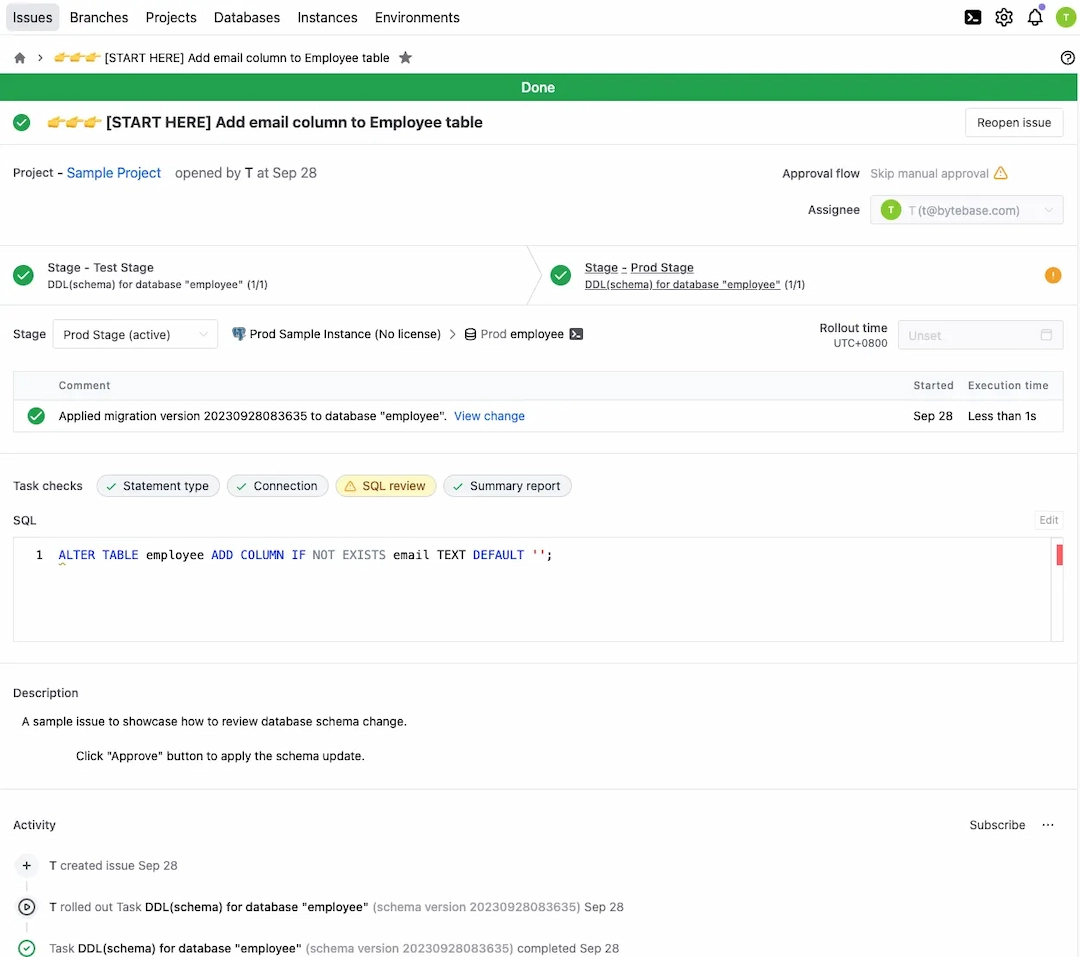
Bytebase implements this workflow with a GitLab/GitHub-style review UI on top of the migration engine, which is our angle on the problem; Flyway or Liquibase driven from your existing CI is the classic alternative and shares all the concepts above.
Summary
After all, database version control is version control: developers expect to manage database changes the way they manage code changes. The stateful twist is that a database versions transitions rather than states, and some transitions only run one way. Respect those two facts (append-only migration history, roll forward by default) and the rest is familiar engineering.