Just-in-Time (JIT) Database Access grants database privileges only when they are needed, scoped to a single task, and revokes them automatically once the task is done. No standing access. No credential that outlives its purpose. The shorter a privilege lives, the smaller the window an attacker — or a mistake — has to use it.
Use cases
The most common case is the incident, and it is the one most JIT tools are built around. An on-call engineer hits a production issue, needs more than read access to investigate, and should hand that access back once the issue is resolved.
But the incident is just the most visible case. The same need shows up whenever access belongs to a task rather than to a role. A developer fixing a bad row in production. A CI job that needs the database only while a migration runs. An analyst pulling numbers for a one-time report. A contractor who should lose all access the day the engagement ends. Break-glass access during an emergency, where the privilege is high but the window must be short and every action recorded.
The principle is the same in all of them: grant for the task, revoke when it is done.
Traditional workflow
Here is a typical workflow offered by existing JIT database access solutions:
- Incident starts.
- On-call visits the JIT system to request elevated database permissions.
- Request is approved. The JIT system provisions a temporary database user and hands the credential to the on-call.
- On-call plugs the credential into their own SQL client, connects to the production database, and starts troubleshooting.
- Incident ends.
- The JIT system revokes the temporary database user, or lets it expire automatically.
These tools automate requesting, granting, and revoking access. What they do not cover is the connection itself — the system that approves access is not the system where the user connects. Once the credential is handed over, two gaps open:
- The user has to configure a fresh set of database credentials in their SQL client every time.
- The system audits the access request, but it never sees the SQL the user actually runs.
Bytebase workflow
Bytebase offers the same self-service request and approval flow for JIT database access. The difference is structural: the request and the connection live in one system. The on-call requests a temporary role and then queries through Bytebase's built-in SQL Editor, so governance never stops at a handoff.
Fine-grained database permissions
By default, a developer holds only the EXPLAIN permission — enough to inspect a query plan, not to read or change data. When an incident hits, they request elevated permissions, use them, and lose them the moment the request expires. Nothing is granted for good. This is Zero Standing Privileges (ZSP): no account carries access it is not using right now.
Integrated SQL Editor
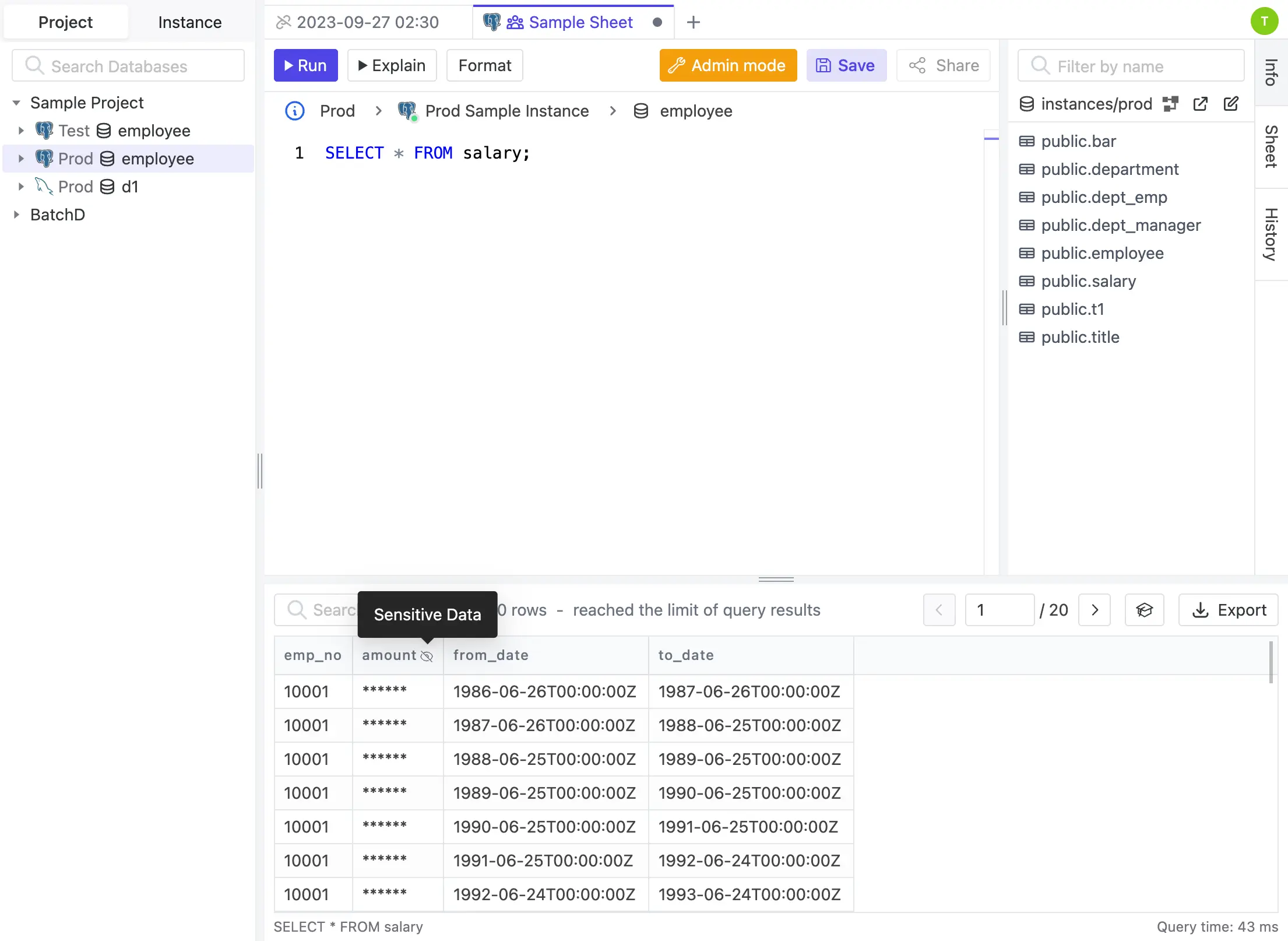
Bytebase ships a built-in SQL Editor, so the user never moves to a separate SQL client — which is exactly where the traditional workflow loses sight of what runs. Every statement goes through Bytebase: review rules can block a dangerous query, and dynamic data masking hides sensitive columns before they reach the screen.
API-first
Bytebase integrates into an existing Internal Developer Portal (IDP) through its API. The tutorial below shows how to embed the SQL Editor and configure database permissions programmatically.
Comparison
| JIT Database Access Features | Traditional | Bytebase |
|---|---|---|
| Self-service request and approval flow | ✅ | ✅ |
| Auto-expiration | ✅ | ✅ |
| Audit logging request | ✅ | ✅ |
| Audit logging SQL | ❌ | ✅ |
| Integrated SQL Editor | ❌ | ✅ |
| Dynamic Data Masking | ❌ | ✅ |
| Custom Integration | ⚠️ Limited due to the lack of a built-in SQL Editor | ✅ |
The request flow is the easy part — every JIT tool has it. The real question is what happens after access is granted: can the system still see and govern the SQL, or only the fact that a request was approved? That is the difference between auditing a request and governing the work.