Beyond Database DevOps, you can also check out Database DevSecOps that integrates security into the database DevOps framework.
Before delving into Database DevOps, let's first review what DevOps is. While there is no uniform definition, DevOps originates from combining software development with deployment and operations, as Wikipedia's history of the movement puts it:
Around 2007 and 2008, concerns were raised by those within the software development and IT communities that the separation between the two industries, where one wrote and created software entirely separate from those that deploy and support the software was creating a fatal level of dysfunction within the industry.
DevOps breaks the silos between developers and operations with shared ownership, workflow automation, and continuous feedback across the software development lifecycle. Database DevOps applies the same treatment to database work: schema changes, data fixes, and query access managed with the same review, automation, and traceability as application code.
Why the Database Is a Decade Behind
Application code got CI/CD in the 2010s; most organizations still deploy database changes the way they deployed code in 2005. That is not inertia, it's physics. Three properties of databases resist the DevOps playbook:
- State. Deploying code replaces the old artifact; deploying a schema change transforms terabytes in place. There is no blue-green for a database: you can't run v41 and v42 side by side and flip a load balancer (expand-contract migration patterns approximate it at the schema level, but the data still transforms in place).
- Irreversibility. A bad code deploy rolls back in minutes. A bad
DROP COLUMNor a mistakenUPDATEhas no undo button, which makes everyone (rationally) slower and more manual. - Blast radius. One database serves many services. The worst code bug breaks its own service; a locked table during a migration breaks everything that touches it.
So the fear is legitimate. The mistake is the conclusion most teams draw from it: since database changes are dangerous, keep them manual. Manual is not the same as safe: read any collection of database postmortems and hand-applied changes are where the wrong-database, wrong-statement, forgot-the-WHERE incidents come from. The DevOps answer is the opposite: because database changes are dangerous, they deserve more automation and review than code, not less.
Roles in Database DevOps
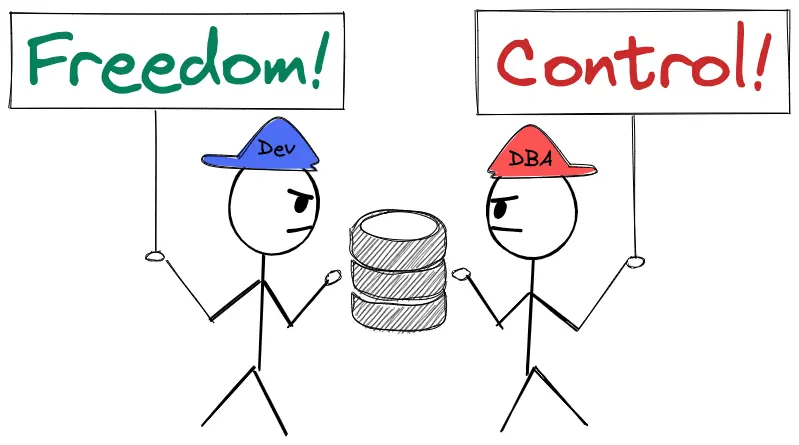
Developer and DBA are the two primary roles, with different and somewhat conflicting priorities:
- Developer - Build and deliver ASAP.
- DBA - Prevent database outage.
The Workflow It Replaces
A typical pre-DevOps schema migration:
- Developer works on the feature locally, applies the schema change to the local DB, tests.
- Developer submits a SQL change request through a ticketing system such as Jira.
- DBA reviews the ticket, exchanging several rounds with the developer.
- DBA applies the change with a SQL client.
- Repeat steps 2-4 for UAT, Staging, and Prod.
Every arrow in that flow is a manual copy between tools: IDE to Jira, Jira to SQL client, SQL client back to Jira. Each copy is an opportunity for the classic failures:
- SQL copied manually → the wrong statement gets pasted.
- SQL reviewed manually → review delay, overlooked anti-patterns.
- SQL deployed manually → applied to the wrong database (the infamous DROP PROD by accident).
And since DBAs are always outnumbered by developers (many organizations don't even have a dedicated DBA, just "the DB person"), the manual review queue becomes the bottleneck for every team that ships.
What Database DevOps Looks Like Instead
The change path moves into the same shape as code delivery:
- The migration script is submitted for review in version control or a purpose-built workflow.
- Automated SQL review runs first: lint rules catch the locking
ALTER, the missing index, the unboundedUPDATE, before a human spends attention on it. - A human approval is matched to risk: routine changes auto-approve, risky ones require the DBA.
- Deployment propagates across environments automatically, in order, with the change history recorded per database.
Two things distinguish a real implementation from a half-adopted one. First, it covers the read path too: ad-hoc production queries go through controlled, logged access rather than shared credentials in a desktop client. Second, drift is watched continuously, because the workflow is only the source of truth if nothing bypasses it (see schema drift).
Tooling-wise, this is assembled from VCS + CI + a migration tool (Flyway, Liquibase), or delivered as an integrated workspace like Bytebase, which covers the change workflow, SQL review, and the governed query path in one place.
How to Tell If You Actually Have It
DevOps earned its credibility through measurement (deployment frequency, lead time, change-failure rate), so hold database DevOps to the same standard. Four questions, answerable with data:
- Lead time: how long from "migration written" to "running in production"? Days-to-weeks means ticket-driven; hours means a pipeline.
- Deployment authority: can a developer ship a routine, policy-passing schema change without a human DBA in the loop? If every change needs the DBA, you have a queue, not a pipeline.
- Change failure rate: what fraction of database changes cause an incident or need remediation? If you can't answer, you have no change history worth the name.
- Access hygiene: when someone queries production, is there a record of who, what, and why? Shared read-only credentials are the "we'll fix it later" that never gets fixed.
The 6 Levels of Database Automation turns these into a maturity scale if you want the full framework.
Summary
Database DevOps is not a tool category so much as a decision: treat database changes as deserving the same engineering rigor as code, then act on it. The teams that make the shift stop debating it within a quarter, because the before/after on lead time and incident count makes the argument for them. The database was the last part of the stack still deployed by hand; it doesn't have to stay that way.